

GenieX: Run Your Own LLM/VLM on the Platform
GenieX is Qualcomm's on-device generative AI inference runtime. It runs language models (LLMs) and vision-language models (VLMs) locally on the Hexagon NPU, the Adreno GPU or the CPU, with no cloud connection. This guide shows how to use it from the CLI, as an OpenAI-compatible server, and from Python.
Runtimes
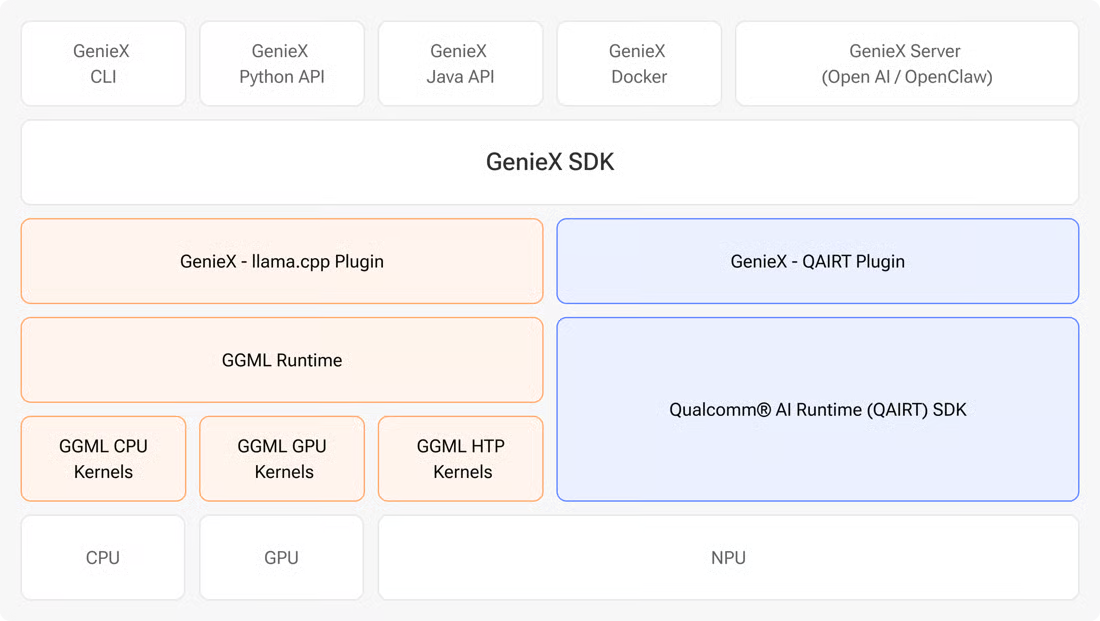
GenieX has one SDK and two runtimes. Pick the runtime that matches your model:
| Runtime | Models | Backends |
|---|---|---|
| llama.cpp | GGUF models from Hugging Face, ModelScope or Docker Hub | NPU, GPU, CPU |
| QAIRT (Qualcomm AI Engine Direct) | Pre-compiled bundles from Qualcomm AI Hub | NPU only, fastest on the NPU |
For GGUF models, choose the Q4_0 precision for the best NPU support. The full model list is in Supported models.
Install
On the platform, run the GenieX installer:
Then check that it works:
For the prerequisites, the PATH setup and the Docker image, see the CLI install guide and the Linux (Docker) guide.
Use GenieX from the CLI
Start an interactive chat with a model. GenieX downloads the model on first use.
Run a QAIRT model from Qualcomm AI Hub on the NPU:
Run a GGUF model through llama.cpp on the NPU:
To ask a VLM about an image, put the image's full path in your prompt, for example Describe the image. Image: /full/path/photo.jpg.
Useful commands and options:
| Command | What it does |
|---|---|
geniex pull <model> | Download a model without starting a chat |
geniex list | List the downloaded models |
geniex model list | List the QAIRT models available for this chipset |
geniex infer <model> --compute gpu | Run a llama.cpp model on npu (default), gpu or cpu |
geniex infer <model> -s "<prompt>" | Set a system prompt |
geniex remove <model> | Delete a downloaded model |
All commands and options are in the CLI reference.
Use GenieX as a Server
geniex serve starts an OpenAI-compatible server, so any OpenAI client can talk to the model without code changes. It does not download models, so pull the model first:
The server listens on http://127.0.0.1:18181. Open that address in a browser on the platform to try the API in the built-in Swagger UI. It provides:
POST /v1/chat/completionsPOST /v1/completionsGET /v1/models
Send it a request from another terminal:
Or use the OpenAI Python client (python3 -m pip install openai):
To send an image to a VLM, add an image_url part to the message. The URL can be a local file path, an HTTP(S) URL or a base64 data URL:
More options are in the local server guide.
Use GenieX from Python
Install the Python SDK (ARM64 Python 3.10 or later):
The API follows Hugging Face transformers. Create example.py:
Run it with python3 example.py.
To ask a VLM about an image, download a sample image:
Then pass it in the message and to generate:
The full API is in the Python API reference.
Learn More
Copyright and License
GenieX is © 2024-2026 Qualcomm Technologies, Inc. and/or its subsidiaries, and is released under the BSD 3-Clause License. Its use is subject to Qualcomm's Terms of Use. The examples on this page are adapted from the GenieX documentation. Qualcomm, Hexagon and Adreno are trademarks or registered trademarks of Qualcomm Incorporated.