

iQS-VLM
This demo runs a vision-language model (VLM) on the platform in real time, powered by GenieX. It reads a live video stream from a UVC Camera, asks the model to describe what it sees, and shows the description on a fullscreen dashboard on the monitor.
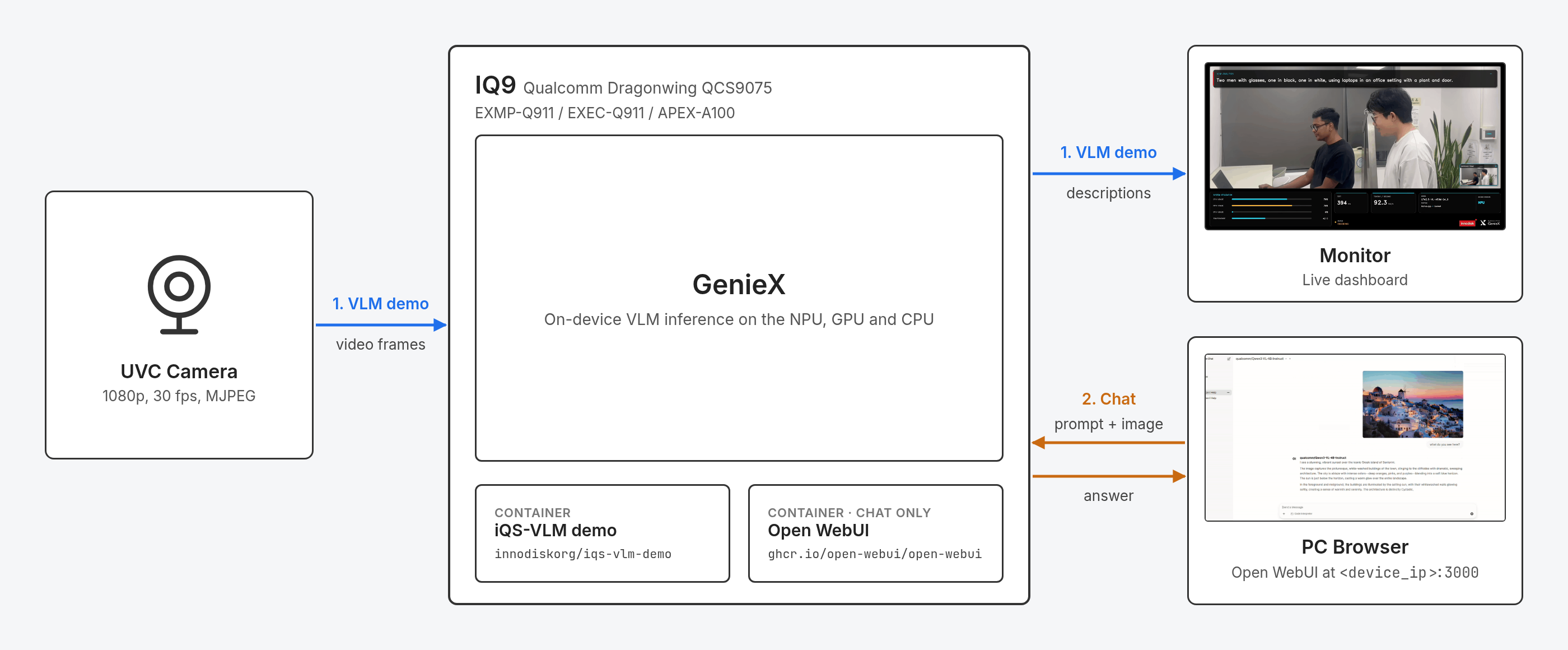
The demo can run in two modes:
- 1VLM demo (default): the camera feed is described live on the monitor.
- 2Chat: you chat with the model from a browser on your PC through Open WebUI. See Chat with the Model through Open WebUI.
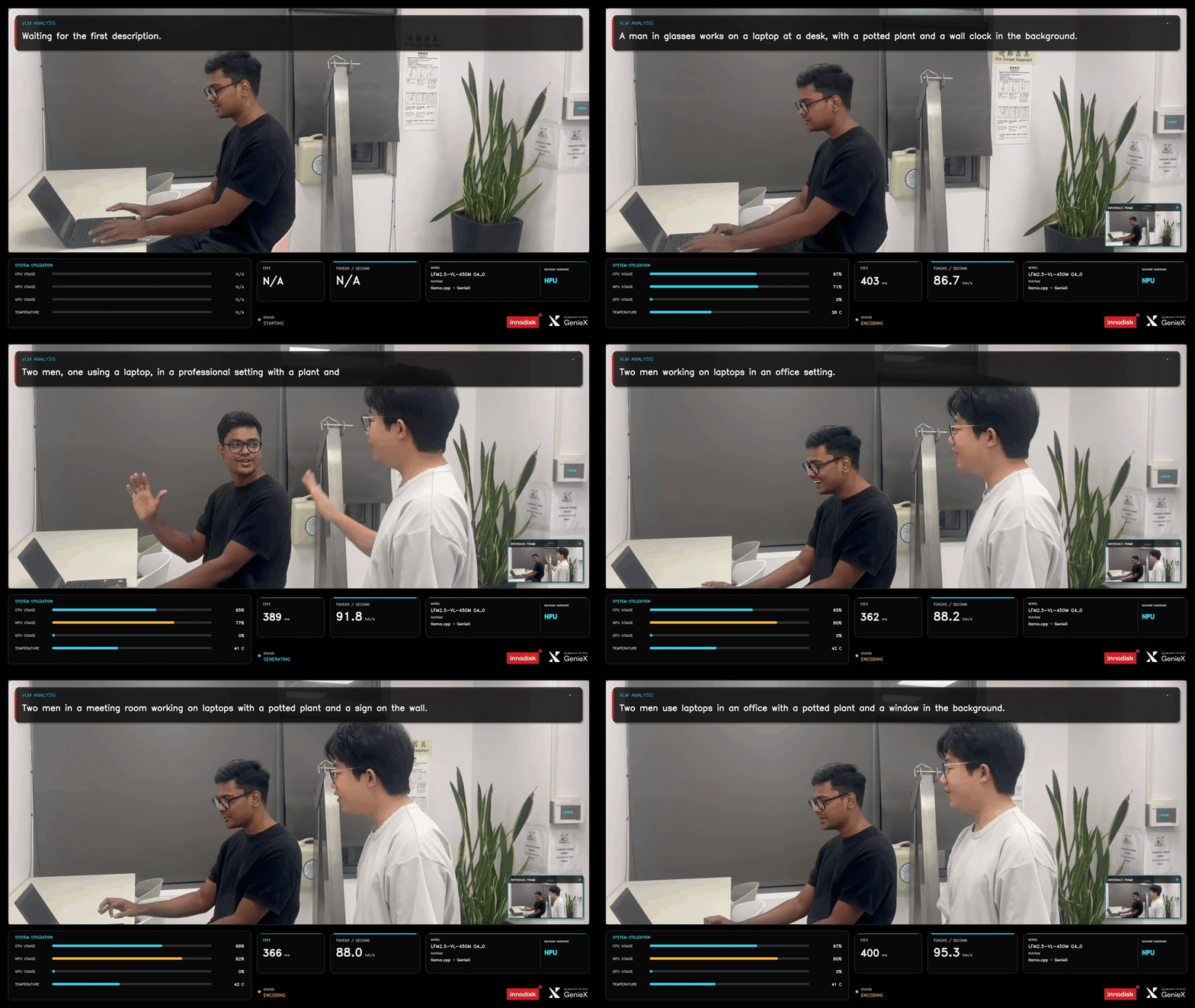
Here is the VLM demo running LFM2.5-VL-450M on the NPU:
Supported Models
The demo ships with two models. Everything runs inside one container image, so nothing has to be downloaded or installed separately.
| Model | Runtime | Backend |
|---|---|---|
| Qwen3-VL-4B (default) | GenieX-Qairt | NPU |
| LFM2.5-VL-450M | GenieX-llama.cpp | NPU, CPU, GPU, Hybrid |
The runtime selects the model: GenieX-Qairt runs Qwen3-VL-4B, and GenieX-llama.cpp runs LFM2.5-VL-450M.
Both runtimes are powered by GenieX v0.9.3.
How to Deploy
Supported Versions
Choose the iQ-Studio version that matches your platform. To check your BSP version, run cat /etc/innodisk/BSP-version on the platform.
| Your platform | iQ-Studio version |
|---|---|
| BSP v2.5.0 or later | v0.0.12 or later |
| BSP earlier than v2.5.0 | v0.0.10 |
Ubuntu image x09 | v0.0.10 |
For v0.0.10, run git checkout v0.0.10 in the iQ-Studio directory before ./install.sh. To return to the latest version, run git checkout main. The demos and tutorials differ between versions, so on v0.0.10 follow the README in that checkout instead of this page.
v0.0.12 use the earlier OGenie-based demo, so we recommend the latest version.What do you need?
- 1
- 2At least 10 GB of free disk space
- 3A monitor
- 4A UVC camera
- 1080p/30fps (1920x1080 pixels)
- MJPEG compression format
Please plug both devices—the UVC camera and the monitor—into the platform.
How to start?
How to Use
Run the demo
One command starts the demo with the default model, Qwen3-VL-4B on the NPU:
The dashboard opens on the monitor once the model has loaded.
Choose a model and backend
Pass the runtime and the backend with --other. The runtime selects the model.
Qwen3-VL-4B (GenieX-Qairt) runs on the NPU only:
LFM2.5-VL-450M (GenieX-llama.cpp) runs on the NPU, CPU, GPU or Hybrid backend. Pick one:
NPU
CPU
GPU
Hybrid
To switch to another model or backend, stop the demo and start it again.
Stop the demo
Press q in the dashboard window, or Ctrl+C in the terminal. The demo shuts down cleanly and prints:
q or Ctrl+C. Killing the container (for example with docker rm -f) can leave NPU memory reserved until the platform is rebooted.Performance
Measured on the NPU with the live camera feed:
| Model | Runtime | Backend | TTFT | Tokens per second |
|---|---|---|---|---|
| Qwen3-VL-4B | GenieX-Qairt | NPU | ~640 ms | ~14 |
| LFM2.5-VL-450M | GenieX-llama.cpp | NPU | ~390 ms | ~92 |
TTFT (time to first token) is the time from sending a camera frame to the model until the first word of the description appears.
Troubleshooting
| Message | What to do |
|---|---|
cannot start: these required host paths are missing: | Usually the UVC Camera is not plugged in. Reconnect it and start again. |
No usable graphical display was found | Make sure the monitor is connected and the desktop is running. |
a container named iqs-vlm-demo already exists | A previous run did not exit cleanly. Run docker rm -f iqs-vlm-demo, then start again. |
invalid launch selection: ... | The runtime and backend do not match. Use the values in Choose a model and backend. |
model warm-up failed | NPU memory is still held by an earlier run that was killed. Reboot the platform. |
Logs are saved on the platform in /var/lib/iqs-vlm-demo/logs.
Chat with the Model through Open WebUI
For advanced features and usage examples, visit this page to learn more.