

Perception AI benchmark between IQ-9075 EVK and NVIDIA AGX Orin
We conducted a benchmark comparison between two AI computing platforms with similar specifications, evaluating an NPU-based system and a GPU-based system. This benchmark aims to provide a reference for users who prioritize power efficiency and inference performance.
Platforms Information
| Platform | NVIDIA Jetson AGX Orin | EXMP-Q911 |
|---|---|---|
| SoM / SoC | NVIDIA Jetson AGX Orin 32GB - Jetpack 5.1.2 [L4T 35.4.1] | Qualcomm IQ-9075 |
| Power plan | 30 W | 30 W (High Performance mode) |
| AI Accelerator | GPU | NPU (Hexagon HTP) |
| AI Runtime | TensorRT | TensorFlow Lite |
| AI Performance | 200 TOPS (Sparse) | 100 TOPS (Dense) |
| Linux Kernel | 5.10.120-tegra | 6.6.90-qli-1.5-ver.1.1-04509-gc4b8666c9a55 |
Benchmark Results
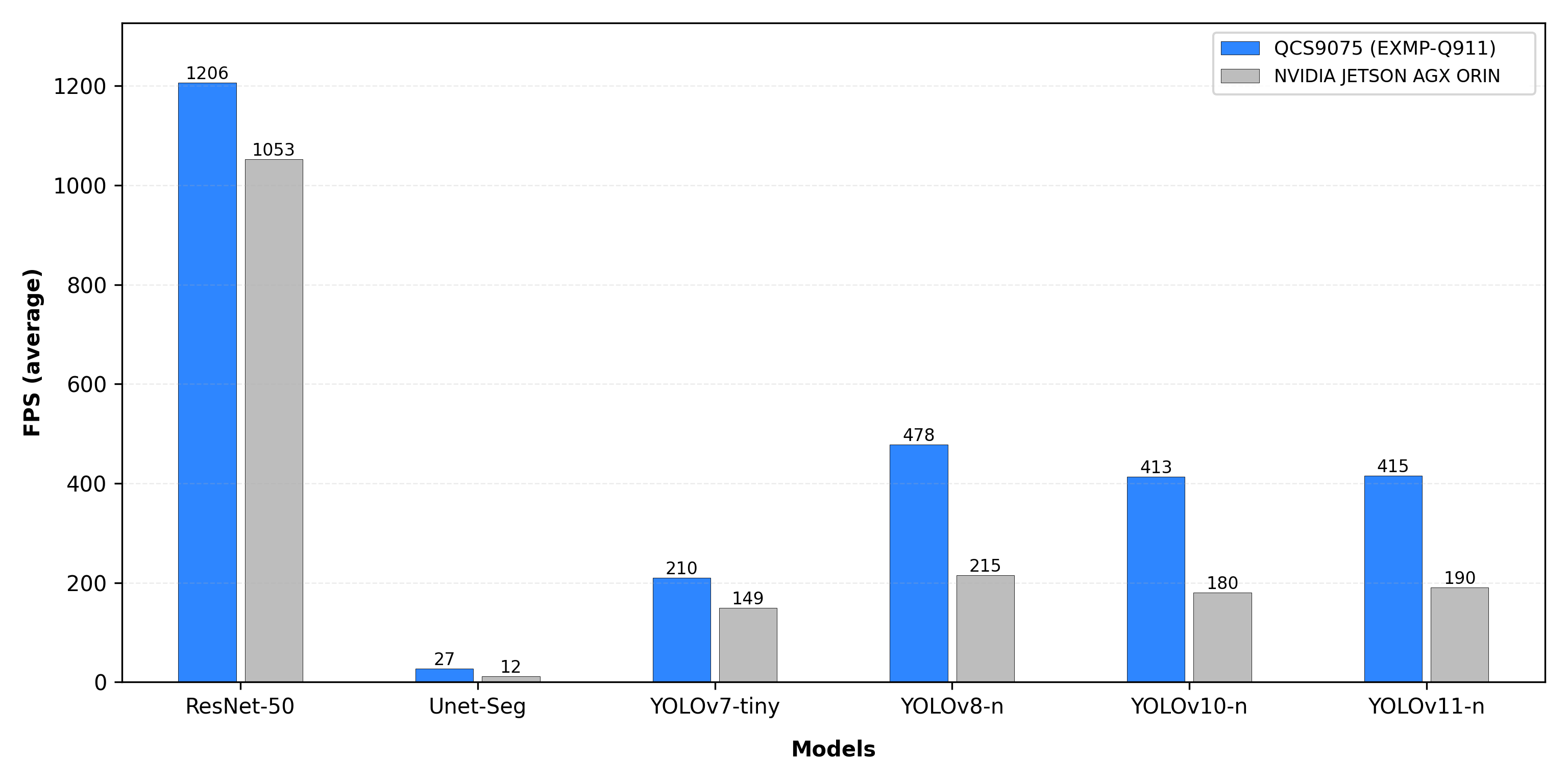
Conclusion
NPUs specialize in converting neural networks into hardware pipelines, optimizing the entire inference process for low latency and power efficiency. GPUs, on the other hand, are built for massive parallelism, executing the same computations across large batches of data, making them ideal for training deep neural networks. In practical applications, NPUs can achieve similar or even better inference efficiency than GPUs while consuming significantly less power.
How to Deploy and Use
We executed benchmarks on the following AI models using both platforms. For each platform below, we describe how to obtain the models and the benchmark procedure/commands.
EXMP-Q911 (Qualcomm QNN):
- 1Get the int8 tflite models from the iQ-Studio release page.
Then, you can extract the
tflite_model.tar.gzfile using the following command to obtain the models:Model Name Input Size YOLOv7-Tiny 640×640 YOLOv8n 640×640 YOLOv10n 640×640 YOLOv11n 640×640 ResNet-50 224×224 U-Net 640×1280 - 2Run the benchmark using the following command to ensure full delegation to the HTP backend
NVIDIA AGX Orin (TensorRT):
- 1
- 2Convert the ONNX model into a serialized TensorRT Engine. The --int8 flag is enabled to leverage the Orin Tensor Cores for maximum throughput.If the ONNX model is exported with separate weights and network structure files, it is highly recommended to merge them into a single serialized ONNX file.
- 3Execute the performance test using the generated Engine.