

iQ-Foundry Model Benchmark
This benchmark compares iQ-Foundry model conversions and their measured performance on EXMP-Q911 (Qualcomm IQ-9075).
Overview
This page compares the accuracy, deployment size, and on-device inference performance of the model combinations supported by iQ-Foundry. The results help users select an appropriate model based on accuracy, inference latency, model size, runtime compatibility, and deployment requirements.
These results provide comparison data rather than a universal model ranking. Select a model according to the requirements of your application and deployment environment.
Hardware and Benchmark Environment
Hardware
| Item | Configuration |
|---|---|
| Target device | EXMP-Q911 (Qualcomm IQ-9075) |
| Inference accelerator | Qualcomm HTP/NPU |
| Power plan | 30 W (High Performance mode) |
| AI performance | 100 TOPS (Dense) |
Benchmark Environment
| Item | Configuration |
|---|---|
| Dataset | COCO 2017 validation dataset |
| Evaluation subset | First 300 validation images |
| Evaluation images | 300 |
| Confidence threshold | 0.25 |
| NMS IoU threshold | 0.7 |
| Maximum detections | 300 |
| Reference model | Pretrained YOLO model from Ultralytics |
How to Read the Results (Metrics)
| Metric | Description | Preferred Direction |
|---|---|---|
| Converted mAP@0.5 | Measured detection accuracy after conversion. | Closer to the reference mAP@0.5 is better |
| mAP delta | Percentage change relative to the original reference model. A negative value indicates lower measured accuracy after conversion; a positive value indicates a slightly higher result on this evaluation subset. | Closer to 0% is better |
| Inference time | Average model invocation latency on the target device. | Lower is better |
| Model size | Storage size of the converted deployment model. | Lower is better |
Benchmark Overview
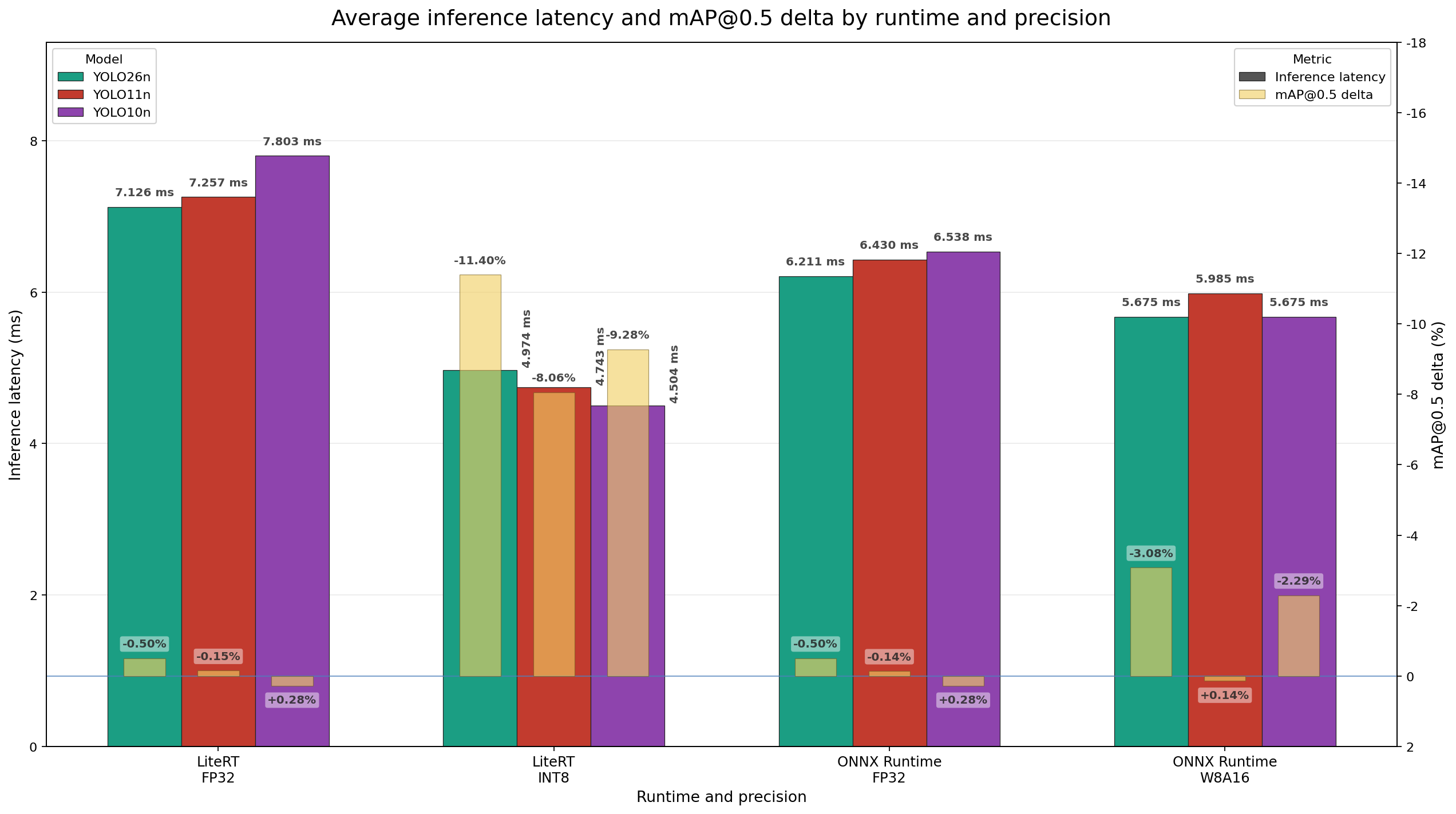
The chart provides a visual comparison of mAP change and model invocation latency across runtime and precision combinations.
O2M) output head, and their quantized conversions used the MSE quantization scheme. YOLOv11 used its default output head, and its quantized conversions used the MinMax quantization scheme.Results
LiteRT
| Model | Precision | mAP@0.5 (Reference) | mAP@0.5 (Converted) | mAP Delta (%) | Inference Time (ms) | Model Size (MB) |
|---|---|---|---|---|---|---|
| yolov26n | FP32 | 0.5232 | 0.5205 | -0.50% | 7.126 | 9.7 |
| yolov11n | FP32 | 0.5287 | 0.5279 | -0.15% | 7.257 | 10.5 |
| yolov10n | FP32 | 0.5258 | 0.5273 | +0.28% | 7.803 | 9.3 |
| yolov26n | INT8 | 0.5232 | 0.4635 | -11.40% | 4.974 | 2.8 |
| yolov11n | INT8 | 0.5287 | 0.4860 | -8.06% | 4.743 | 2.9 |
| yolov10n | INT8 | 0.5258 | 0.4770 | -9.28% | 4.504 | 2.6 |
ONNX Runtime
| Model | Precision | mAP@0.5 (Reference) | mAP@0.5 (Converted) | mAP Delta (%) | Inference Time (ms) | Model Size (MB) |
|---|---|---|---|---|---|---|
| yolov26n | FP32 | 0.5232 | 0.5205 | -0.50% | 6.211 | 8.7 |
| yolov11n | FP32 | 0.5287 | 0.5280 | -0.14% | 6.430 | 9.3 |
| yolov10n | FP32 | 0.5258 | 0.5273 | +0.28% | 6.538 | 8.2 |
| yolov26n | W8A16 | 0.5232 | 0.5071 | -3.08% | 5.675 | 4.9 |
| yolov11n | W8A16 | 0.5287 | 0.5294 | +0.14% | 5.985 | 5.2 |
| yolov10n | W8A16 | 0.5258 | 0.5137 | -2.29% | 5.675 | 4.6 |
Conclusion
There is no single best model for every deployment. Choose a model by considering:
- Required detection accuracy
- Acceptable accuracy reduction
- Inference-latency requirement
- Model-size limitation
- Runtime compatibility
- Deployment environment
FP32 provides the closest measured accuracy to the reference models in this benchmark. The quantized models provide reduced size and lower measured invocation latency, with model-dependent accuracy changes. Evaluate these trade-offs according to the requirements of your use case.
For application-based recommendations, see the iQ-Foundry Model Selection Guide.
Benchmark and Deploy Your Model
Use the following workflow to convert a supported YOLO model, evaluate its converted accuracy, deploy it to EXMP-Q911, and measure model invocation latency. Before starting, complete the iQ-Foundry host setup for your operating system:
The workflow has three stages:
- Convert the model for the selected runtime and precision using
qc. - Compare the reference and converted model accuracy using
mAP. - Deploy the converted model through ADB and measure invocation latency using
test.
Replace the placeholder paths in the commands below with the paths for your model and evaluation data.
Convert the Model for Deployment
Run the following command from the iQ-Foundry repository root to create a deployment model:
--calib_dir is required for quantized conversion. Omit --calib_dir for FP32 conversion.Use one of the following runtime and precision supported combinations:
| Runtime | Precision |
|---|---|
| LiteRT | FP32 |
| LiteRT | INT8 |
| ONNX Runtime | FP32 |
| ONNX Runtime | W8A16 |
Evaluate Conversion Accuracy
Compare the reference and converted model accuracy at mAP@0.5:
The generated report contains the reference mAP, converted mAP, and mAP change. Use these results to assess the accuracy impact of conversion for your deployment.
Deploy and Measure Inference Latency
Deploy the converted model to EXMP-Q911 through ADB and measure model invocation latency:
The target EXMP-Q911 must be connected and visible through ADB. To compare your latency result with this page, /path/to/benchmark_images should contain the same first 300 COCO validation images used for the published benchmark.
At the end of the command output, record:
This value represents the average model invocation latency.