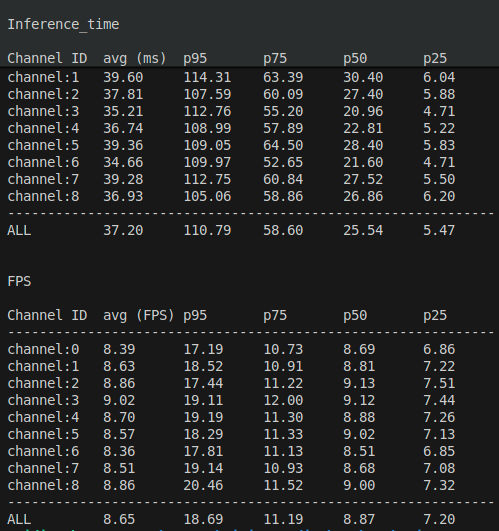
Multi-stream inference status on Jetson AGX and Qualcomm IQ-9075
This benchmark measures how throughput and latency scale as channels are added, running iQS-Streampipe on an NVIDIA Jetson AGX Orin 32GB and an EXMP-Q911 — useful for sizing a deployment (how many cameras per board), not as a general hardware ranking. A recording of live multi-stream inference is available here.
- Application: iQS-Streampipe
- Task: object detection with an INT8 model
- Input: 1080p, 30 FPS H.264 video streams
- Platforms: Jetson AGX Orin 32GB, EXMP-Q911 (Qualcomm IQ-9075-based module)
- Metrics:
- Output average end-to-end FPS per channel
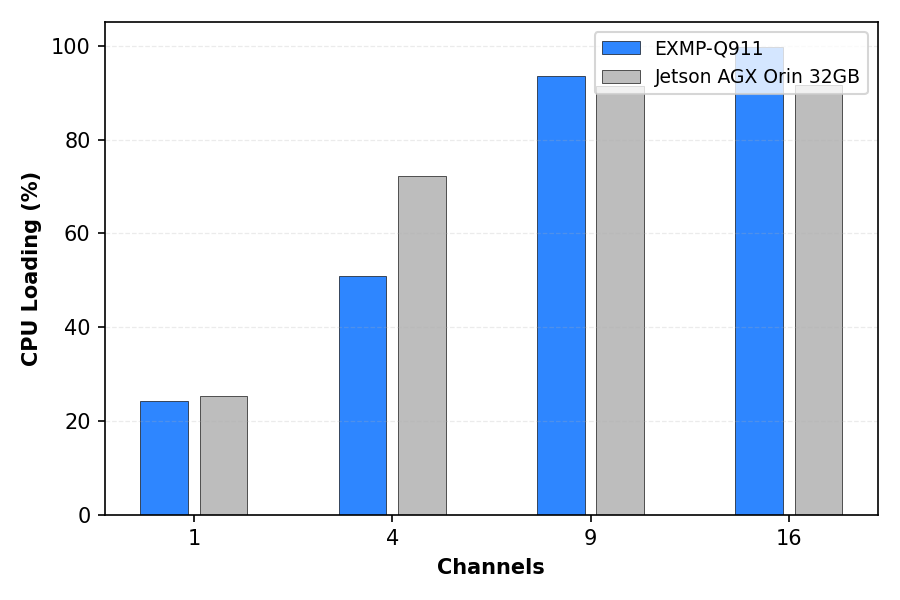
- Average CPU loading (%)
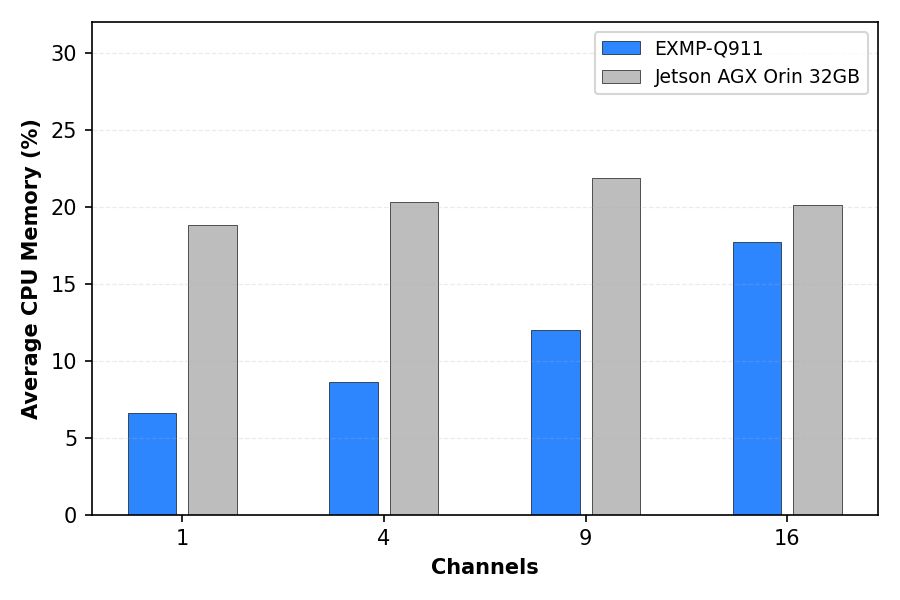
- Average CPU memory usage (%)
- Output end-to-end FPS percentiles (P95, P75, P50, P25)
- Channel counts: 1, 4, 9, 16
Hardware
The benchmark uses two edge AI platforms with the configurations shown below.
| Platform | NVIDIA Jetson AGX Orin 32GB | EXMP-Q911 (IQ-9075) |
|---|---|---|
| SoM / SoC | NVIDIA Jetson AGX Orin 32GB | Qualcomm IQ-9075 |
| Power plan | MAXN | Normal |
| Processor cores | 8 | 8 |
| AI accelerator | GPU | NPU |
| AI runtime | TensorRT 10.3.0.30 | TFLite (QNN 2.32) |
| AI performance | 200 TOPS | 100 TOPS |
| Linux kernel | 5.15.148-rt-tegra (PREEMPT_RT) | 6.6.97-qli-1.6-ver.1.2.1-05029-g53c11c30e98d (PREEMPT) |
AI model
| Architecture | Numerical precision | Parameters | Input size | Model size | Model format | Dataset | Classes |
|---|---|---|---|---|---|---|---|
| YOLOv10n | INT8 | 2.3 M | 640 × 640 | 2.32 MB | TFLite | Innodisk PPE | 5 |
Videos
| File type | Resolution | Frame rate | Codec | Bitrate | File size | Length |
|---|---|---|---|---|---|---|
| MP4 | 1080p | 30 FPS | H.264 | 3524 kb/s | 45.37 MB | 27 s |
Results
Measurement summary
| Platform | Channels | Cores | Warm-up (s) | Power mode | CPU loading (%) | Average CPU memory (%) | Output average E2E FPS/channel | P95 (E2E FPS) | P75 (E2E FPS) | P50 (E2E FPS) | P25 (E2E FPS) |
|---|---|---|---|---|---|---|---|---|---|---|---|
| EXMP-Q911 | 1 | 8 | 180 | Normal | 24.2 | 6.6 | 29.46 | 31.05 | 30.41 | 30.00 | 29.62 |
| EXMP-Q911 | 4 | 8 | 180 | Normal | 51.0 | 8.6 | 29.47 | 32.53 | 30.60 | 30.00 | 29.44 |
| EXMP-Q911 | 9 | 8 | 180 | Normal | 93.6 | 12.0 | 28.41 | 59.88 | 37.55 | 29.55 | 24.25 |
| EXMP-Q911 | 16 | 8 | 180 | Normal | 99.8 | 17.7 | 15.90 | 44.17 | 24.00 | 16.91 | 12.86 |
| NVIDIA Jetson AGX Orin 32GB | 1 | 8 | 180 | MAXN | 25.3 | 18.8 | 29.78 | 39.78 | 31.28 | 29.82 | 28.55 |
| NVIDIA Jetson AGX Orin 32GB | 4 | 8 | 180 | MAXN | 72.3 | 20.3 | 21.26 | 52.68 | 30.59 | 22.23 | 17.13 |
| NVIDIA Jetson AGX Orin 32GB | 9 | 8 | 180 | MAXN | 91.5 | 21.9 | 7.58 | 18.09 | 10.46 | 7.88 | 6.11 |
| NVIDIA Jetson AGX Orin 32GB | 16 | 8 | 180 | MAXN | 91.7 | 20.1 | 4.29 | 8.86 | 5.75 | 4.46 | 3.54 |
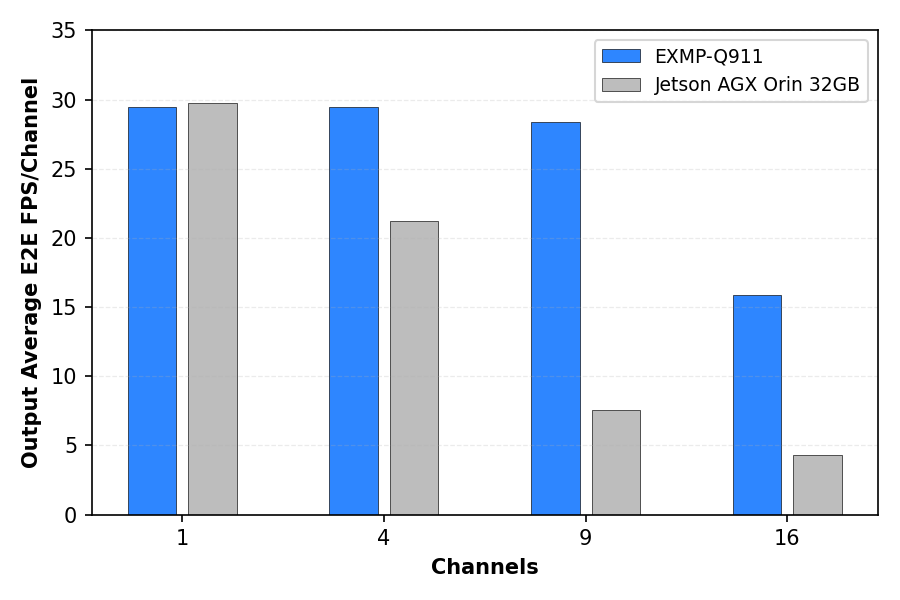
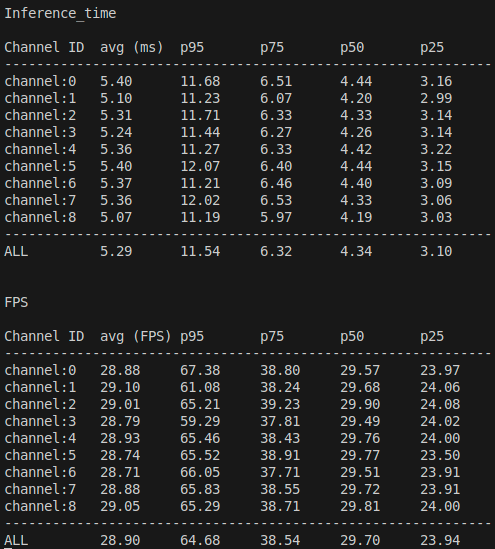
- The FPS plot (left) shows that both platforms keep per-channel FPS close to 30 at lower channel counts and gradually lose per-channel throughput as channels increase; EXMP-Q911 stays nearer to real-time at medium and higher channel counts, while Jetson AGX Orin drops earlier.
- The CPU loading plot (middle) shows low utilization at 1 channel and a steady increase as more channels are added, with both platforms near or at high CPU usage at 9 and 16 channels; the points where CPU load approaches saturation align with the visible per-channel FPS reductions.
- The CPU memory plot (right) shows that memory usage rises with channel count on both platforms but remains in a moderate range; in this benchmark, scaling behavior is dominated by CPU load and per-channel FPS rather than memory capacity limits.
Conclusion
Under the aligned 8-core configuration, both systems show the same pattern: as channel count increases and CPU usage approaches saturation, per-channel FPS drops from near real-time to lower values. In this workload, near real-time FPS per channel is sustained up to 9 channels on EXMP-Q911, while on NVIDIA Jetson AGX Orin 32GB the per-channel FPS is already below real-time at higher channel counts as the load increases.
How to Use
Below is an overview of how we conduct platform benchmark testing.
EXMP-Q911
- 1Install iQ Studio
- 2From the repository root on EXMP-Q911, change to the benchmark directory:
- 3Edit
config.jsonso that thestreamsarray contains 1, 4, 9, or 16 entries, depending on the channel count being tested. - 4Run the benchmark script with the Qualcomm platform selected:
NVIDIA Jetson AGX Orin 32GB procedure
- 1Download the archive using the following command.
- 2Under
benchmarks/iq-9075/multi-stream/iqs-streampipe, extract the NVIDIA benchmark archive:This provides
config_nv.json, thevideos/directory, and thenvidia/streampipe_nvbinary with its engine file. - 3Set the power mode to MAXN:
- 4Run the benchmark script with the NVIDIA platform selected: